
APIs and API Testing: The Big Picture
Welcome to a fascinating and critical area of test automation! You've likely heard the term "API" used constantly, but it can often feel like an abstract concept. What is it really, and why has it become so fundamental to the way we build and interact with software?
Before we can write a single line of code to test an API, we must first build a solid mental model. We need to understand what an API is, what it does, and why testing it directly is one of the most powerful strategies in a modern quality assurance toolkit. This lesson will give you the foundational "why" that provides context for all the "how-to" lessons that follow.
Let's pull back the curtain, look past the user interface, and see the powerful engine that runs underneath.
Deconstructing the API
The acronym API stands for Application Programming Interface. Let's break that down, because each word is important.
- Interface: Think of an interface as a point where two different systems meet and interact. The dashboard of your car is an interface; you don't need to know about the engine's combustion cycle to use the steering wheel. The remote for your TV is an interface; you press buttons to interact with the TV's complex internal electronics without needing to understand them. It's a layer of abstraction that simplifies interaction.
- Programming: This tells us the interface is defined in code. It's not a physical set of buttons; it's a formal contract written by developers, with specific functions, methods, data formats, and rules that other programmers must follow to interact with it.
- Application: This specifies that the interface is designed for one software application to talk to another software application, not directly for a human end-user.
The Delivery Service Analogy
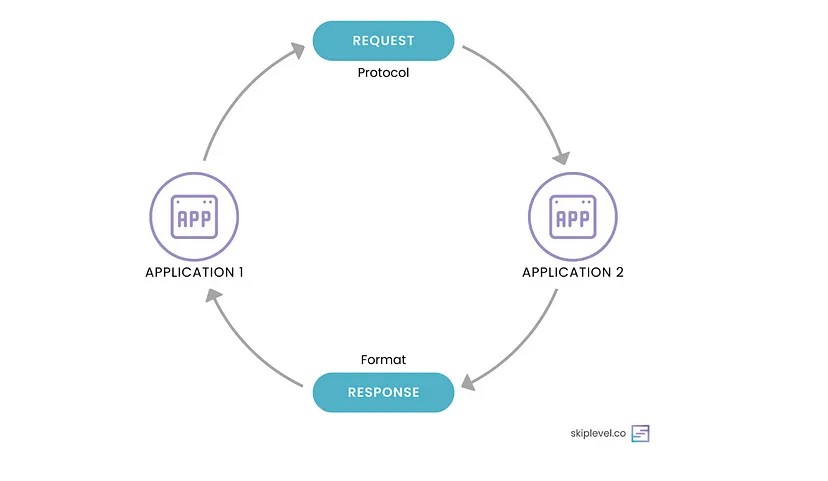
To tie this all together, let's use a detailed analogy. Imagine an API as a modern package delivery service that connects you with a warehouse.
In this scenario:
- You (the Client Application) are a customer wanting to order a product. This could be a mobile app, a website's frontend, or even another backend service.
- The Warehouse (the Backend Server) is the system that holds all the data (the products) and contains the business logic for processing orders.
- The Delivery Company (the API) is the crucial intermediary that handles all communication.
The process works like this:
- The Request (The Order Form): To order a product, you can't just shout at the warehouse. You must fill out a specific form provided by the delivery company. This form is the API request. It has required fields like your address, the item number, and quantity. If you fill out the form incorrectly (e.g., missing a postal code), the company rejects it immediately. This is like an API returning a
400 Bad Requesterror. - The Courier (The API Endpoint & Method): The delivery company offers different services. You might choose "Standard Delivery" to retrieve information, "Schedule a Pickup" to create something new, or "Change Delivery Address" to update an existing order. These services are like the API's endpoints (the specific addresses you send requests to) and the HTTP methods (
GET,POST,PUT) that define the action you want to take. - The Warehouse (The "Black Box" Server): The delivery company takes your valid order form and routes it to the correct warehouse. The warehouse has its own internal processes for locating the item, checking inventory, and packaging the product. As the customer, you are completely unaware and unconcerned with this internal complexity. This is the "black box" nature of using an API.
- The Response (The Delivered Package): Finally, the delivery company brings a package to your door. This is the API response. If the item is available, the package contains exactly what you asked for (the response body or data). Along with it comes a status label like "Delivered" (similar to a
200 OKresponse). But if the item doesn't exist – say, it's out of stock or the product ID is invalid – you won't receive a package at all. Instead, you'll get a clear status update like "Item Not Found", which maps to an HTTP status such as404 Not Found. This gives you an immediate understanding of how your request was handled.
Why APIs Are the Engine of Modern Software
Understanding the "delivery service" model is key because this pattern is everywhere. APIs are not just a niche technical detail; they are the fundamental building blocks of the modern digital world. Here's why they are so critical:
Powering Mobile and Web Applications
Think about the apps you use daily – social media, banking, weather, e-commerce. The graphical interface you see on your phone or in your web browser is often just a "shell". It doesn't contain the core data or logic. When you open your banking app, the app immediately makes API calls to a server to fetch your account balance, recent transactions, and profile information. Every action you take – transferring money, paying a bill – triggers another API call. The app is completely decoupled from the backend server, and the API is the only bridge between them.
The Backbone of Microservices
Not long ago, large applications were often built as single, massive units called monoliths. This made them difficult to update, scale, and maintain. The modern approach is a microservice architecture, where a large application is broken down into a collection of smaller, independent services. Each service is responsible for a specific business function (e.g., user management, payment processing, inventory). How do these services talk to each other to form a cohesive application? They use APIs. This allows teams to work on different services independently and deploy them without affecting the rest of the system.
Enabling the Connected World
APIs allow businesses to securely expose parts of their data and functionality to third parties, creating a massive ecosystem of interconnected services.
- When a travel aggregator site like Kayak or Skyscanner shows you flights from dozens of airlines, it's using each airline's public API to fetch flight data in real-time.
- When you pay for something online with PayPal or Stripe, the e-commerce site uses their payment API to process the transaction securely without ever handling your credit card details directly.
- When you log into a new service using your Google or Facebook account, you are using their authentication APIs.
Defining API Testing: A Look Under the Hood
Given that APIs are the critical plumbing of modern software, it's clear we need to test them thoroughly. So, what is API testing?
It concentrates on testing the core business logic, data responses, security, and performance of the application at the service layer.
API Testing vs UI Testing: A Quick Comparison
It's helpful to contrast the two main approaches to functional test automation:
| Aspect | UI Testing | API Testing |
|---|---|---|
| Layer of Focus | Presentation Layer (What the user sees and clicks) | Business Logic / Service Layer (The "engine" under the hood) |
| Speed | Slow. Must launch a browser, render pages, and wait for animations. | Extremely Fast. Direct network calls without UI overhead. Hundreds can run in seconds. |
| Stability | Brittle. Frequent changes to UI elements (locators, CSS) break tests. | Stable. API contracts change much less frequently than the UI. |
| Feedback Loop | Late. The UI is often the last thing to be built. | Early. Can begin as soon as the API contract is defined, even before the UI exists. |
| Test Coverage | Difficult to simulate complex backend errors or security exploits. | Excellent for testing edge cases, error handling, and security vulnerabilities. |
Conclusion: They are not enemies; they are partners! A comprehensive strategy uses both. API tests form a large, fast, and stable base of a "test pyramid", checking the core logic, while a smaller number of UI tests validate the end-to-end user experience.
A Spectrum of API Testing Types
API testing is not a single activity but a category that encompasses several testing types to ensure all aspects of the service are robust and reliable. While we will focus primarily on functional testing in this block, a professional test automation engineer should be aware of the whole spectrum.
Functional Testing
This is the bedrock of API testing. It focuses on verifying that the API works according to its specified business requirements. It answers the question: "Does the API do what it's supposed to do?"
- What: Testing the main functions (CRUD operations: Create, Read, Update, Delete) and validating the data that goes in and out.
- Why: To ensure the core business logic is implemented correctly.
- Examples: Does
GET /users/123return the correct data for user 123? DoesPOST /userswith a valid payload create a new user in the database and return a201 Createdstatus? Does the same request with a missing email address correctly return a400 Bad Requestwith a clear error message?
Integration Testing
Modern applications are rarely self-contained. They are often a web of interconnected services. Integration testing verifies the communication between these services.
- What: Testing a complete workflow that may involve calls between multiple APIs or services.
- Why: A single service might work perfectly in isolation but fail when it tries to communicate with another. This testing finds issues at the integration points.
- Example: When a user places an order, does the
Order Servicecorrectly call thePayment Serviceto process the payment, and does thePayment Servicethen correctly call theNotification Serviceto send a confirmation email?
Performance & Load Testing
This type of testing focuses on the "non-functional" aspects of the API, specifically its speed, scalability, and stability under pressure.
- What: Subjecting the API to various levels of concurrent user requests and traffic patterns.
- Why: To find performance bottlenecks, measure response times under load, determine the system's capacity, and ensure it doesn't crash during peak usage.
- Example: What is the average response time for the product search API when 500 users are using it simultaneously? At what point does the response time become unacceptably slow?
Security Testing
Security testing involves actively trying to find and exploit vulnerabilities in the API before malicious actors do.
- What: Probing the API for security flaws related to authentication, authorization, data exposure, and injection attacks.
- Why: To protect sensitive data and prevent unauthorized access or system manipulation. APIs are a primary target for attackers.
- Example: Can a regular user access an admin-only endpoint by guessing the URL? What happens if I send a SQL injection script in a parameter? Does the API properly restrict access based on user roles?
Implementing test automation enhances the efficiency, reliability, and coverage of API testing. For Functional Testing, automated scripts can quickly run through numerous test cases, ensuring that core functionalities remain consistent even after code updates. In Integration Testing, automation helps simulate interactions between different services, identifying issues without manual intervention. For Performance & Load Testing, automation is indispensable for simulating high traffic and varied load conditions efficiently, something that would be cumbersome to do manually. Similarly, in Security Testing, automated tools can continuously scan for vulnerabilities, ensuring that security measures remain robust over time.
By integrating test automation into these practices, teams can achieve more comprehensive coverage, faster execution, and consistent results, ultimately leading to more reliable and secure APIs. Automation not only frees up valuable time for testers to focus on more complex issues but also ensures that testing processes are scalable and maintainable as the application evolves.
Key Takeaways
- An API is a formal specification that allows different software applications and services to communicate with each other using a defined set of rules.
- APIs are the fundamental engine behind most modern web, mobile, and microservice-based applications.
- API testing validates the application's core business logic directly at the service layer, independent of the UI.
- Compared to UI testing, API testing is significantly faster, more stable, and allows for earlier feedback and better coverage of complex scenarios.
- A complete API testing strategy includes functional, integration, performance, and security testing to ensure all aspects of the service are high quality.
Explore the World of APIs
- Postman: What is an API? A great, high-level explanation of APIs from the makers of a leading API testing platform.
- IBM: What is API Testing? A solid overview of API testing concepts and its importance in the software lifecycle.
- Github: The Public APIs Repository Explore an extensive list of public APIs from different domains.